Tag: ecommerce

  • How to Start Shopify Dropshipping 2026–2027 (Step-by-Step Guide)

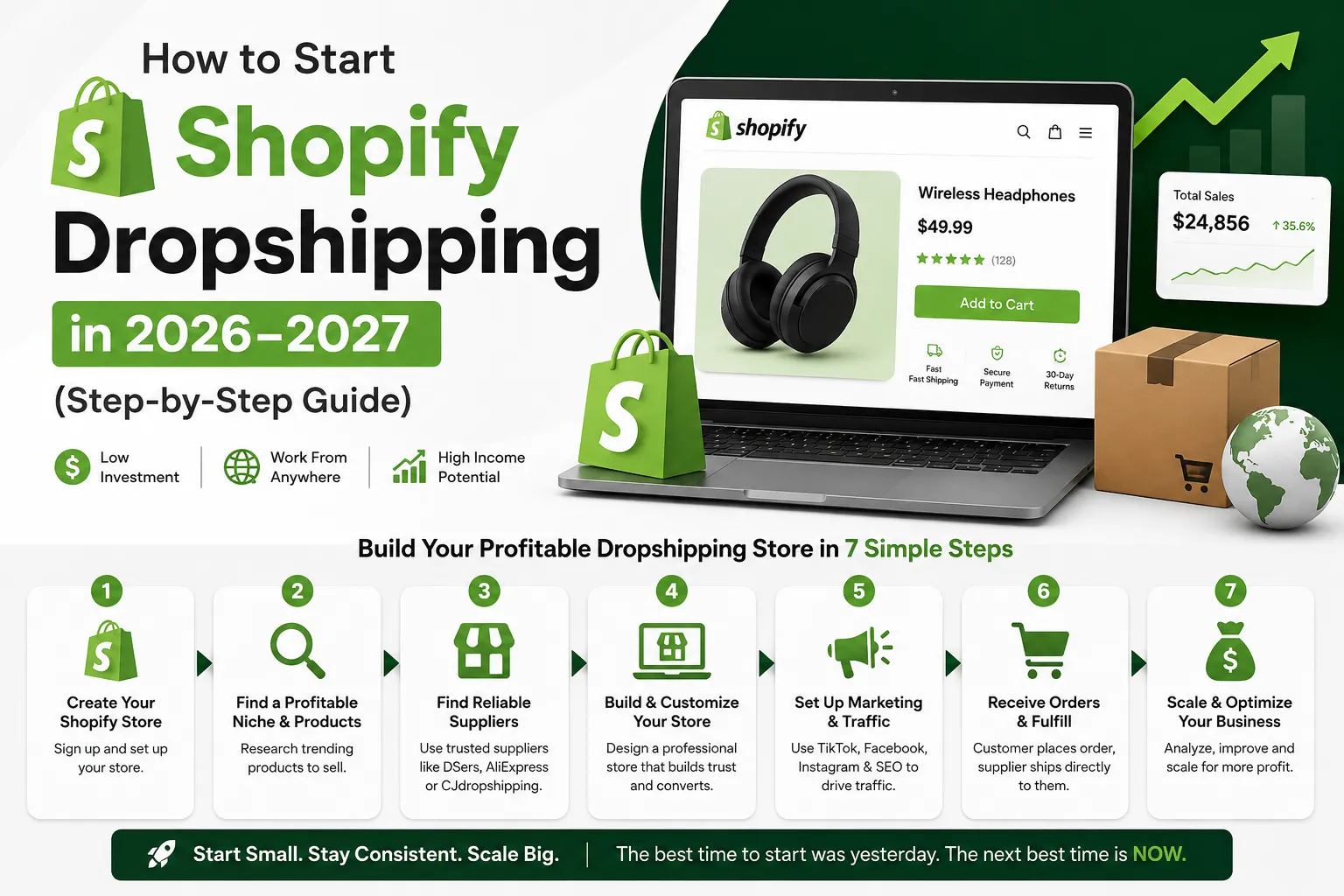
    How to Start Shopify Dropshipping 2026–2027 (Step-by-Step Guide)

    How to Start Shopify Dropshipping in 2026–2027 (Step-by-Step Guide)


    Introduction

    Starting Shopify dropshipping store feels exciting until you actually sit down to do it. I remember staring at my screen past midnight, watching tutorials that all contradicted each other. One demanded a huge budget. Another promised overnight results.

    I even launched my first product, a portable phone stand, without ordering a sample. It arrived scratched and poorly packaged. That refund request taught me more than any YouTube video ever did.

    Most newcomers just want one thing: a straight, honest answer. That is exactly what this is.

    Shopify dropshipping still works in 2026–2027, but only if you approach it right. Customer orders, supplier ships, you keep the margin. Simple model. But customers are smarter now, and a slow page or a blurry photo loses the sale instantly. Sellers who lead with trust and real value still win. That part never changes.

    Shopify dropshipping still works in 2026–2027, especially for beginners who understand the differences between platforms like Shopify and WordPress before launching a store.
    You can read this article to know the difference between these platforms. Shopify Vs WooCommerce! Complete comparison


    Understanding the Full Picture Before Spending Anything

    Before committing a single dollar, understand what actually drives a sale.

    It is not just about having a good product. It is the entire experience around it, how fast the page loads, whether the photos look authentic, what happens when something goes wrong. Most failed stores are not missing a great product. They are missing basic trust signals that tell a stranger it is safe to hand over their payment details.

    Two sellers once listed the exact same kitchen tool at the same price. One used manufacturer photos and copied wholesale descriptions. The other showed the item being used in a real kitchen, answered common objections directly on the page, and displayed a simple 30-day return policy in the header. The second seller outsold the first by a wide margin within a month.

    That gap is almost always fixable — and fixing it costs almost nothing.


    Picking the Right Product Category

    Trying to sell everything to everyone is one of the fastest ways to go nowhere.

    Focused stores build a reputation far faster. And in this environment, your reputation is your most valuable asset. I tested three different general stores before accepting this. Each one felt busy and purposeful to build, and each one failed to connect with any particular audience.

    The best niches tend to solve a small but persistent daily frustration — or they serve people who are genuinely passionate about a specific interest. Ergonomic work accessories, fitness recovery gear, travel organization tools, and specialty pet care all hold up because demand is steady rather than trend-dependent.

    How to research before committing: Use Google Trends to check whether interest in a category is stable or declining. Browse the top-selling items on AliExpress and CJ Dropshipping within a niche, then cross-reference those products against Amazon reviews — specifically the one and two-star reviews. Those complaints are your product improvement brief and your marketing angle at the same time. If people consistently complain that a competitor’s version breaks after two weeks, your opportunity is durability messaging.

    Look for products that check most of these boxes:

    • Solve an everyday problem people openly talk about
    • Difficult to find conveniently in local shops
    • Easy to demonstrate visually in a short video
    • Lightweight enough to keep shipping costs manageable
    • Durable enough to avoid regular return requests
    • Priced with enough margin to absorb advertising costs

    One seller built a steady business around a lumbar support cushion by focusing messaging entirely on the relief office workers feel at the end of a long day. That single emotional angle — not the foam density, not the dimensions — drove sales. The product was ordinary. The positioning was not.


    Building a Store People Actually Trust

    You do not need a complicated website. You need a clear one.

    Clean layout, easy navigation, fast loading, and honest policies put you ahead of most beginner stores. I spent weeks on my second store choosing colors and fonts while my checkout process had three unnecessary steps and no visible return policy anywhere on the page. I was decorating a house with a broken front door.

    Shopify’s built-in themes — particularly Dawn and Sense — are genuinely solid starting points. Resist the urge to buy a premium theme before you have validated a single product. The theme is rarely the reason a store does not convert.

    Your product page needs to answer these questions without making anyone hunt:

    • What does this actually do?
    • What specific problem does it solve for me?
    • What does it look, feel, or function like in real life?
    • When will it arrive?
    • What happens if it is not right?

    After my second store’s product pages were rewritten in plain, benefit-first language — and after I added real lifestyle photography instead of white-background stock images — the conversion rate improved noticeably within the first two weeks. Sometimes the simplest changes carry the most weight.

    A minimalist skincare brand once stripped away all decorative graphics and rewrote descriptions in plain language. Orders increased. Removing clutter was the actual upgrade.


    Finding Suppliers Worth Keeping

    Your supplier relationship is either your biggest asset or your biggest headache. There is rarely much in between.

    Slow shipping used to be tolerable. Now it drives negative reviews and refund requests at a pace that can end a store before it finds its footing. Here is how I evaluate any new supplier before committing:

    Step 1 — Order a sample personally. One test order reveals packaging quality, actual transit time, and product consistency before a customer experiences any of it. This step is non-negotiable.

    Step 2 — Message their support team first. Ask a basic question about shipping timelines. How quickly they respond, and how clearly they communicate, tells you a great deal about how they will handle problems down the road.

    Step 3 — Check their reviews across multiple platforms. Look specifically for patterns in complaints — not individual bad reviews, but repeated themes around delays, broken items, or poor communication.

    Reliable platforms worth working with include CJ Dropshipping for competitive pricing and warehouse flexibility, Zendrop for US-based inventory that supports faster domestic delivery, and AliExpress for broad catalog testing in early stages. Each has genuine strengths depending on where your customers are located.

    One store owner switched to a slightly pricier supplier after consistent shipping delays. Per-unit profit dropped modestly. Five-star reviews increased sharply and return requests dropped by roughly 60% over the following two months. That trade-off was unquestionably worth it.


    Writing Copy That Sounds Like a Real Person

    Most wholesale product descriptions are either robotic or completely generic. Copying them directly onto your store is one of the most common and damaging mistakes beginners make.

    Instead of: “Rechargeable 300W blender with six stainless steel blades.”

    Try: “Fits right in your gym bag. Fresh smoothie ready before you reach the office — no fuss, no cleanup.”

    One version lists hardware specifications. The other sells a moment in someone’s actual day. People buy outcomes and feelings far more readily than feature lists.

    Keep tone conversational and skip the inflated promises. Honest copy that sets accurate expectations generates fewer disputes and noticeably better repeat purchase rates. I once ran two nearly identical ad sets — one with spec-heavy copy, one with scenario-based copy — and the scenario version consistently produced a lower cost per purchase across two separate products.


    Marketing, SEO, and TikTok Strategy

    Paid ads can work. Relying on them exclusively, especially early on, burns through budget fast and leaves you with nothing lasting.

    For organic search (SEO): Your product titles and descriptions should include the specific phrases people actually type into Google. Use Google’s autocomplete and the “People also ask” section to find these naturally. A product titled “Portable Lumbar Support Cushion for Office Chair” will pull organic traffic. “Back Comfort Pro X3” will not. Tools like Google Search Console and Ubersuggest help track which terms are bringing visitors over time. Installing Google Analytics 4 from day one means you never lose that data.

    For TikTok and Instagram Reels: The format that consistently performs is the problem-solution-reveal structure. Open with a relatable frustration in the first two seconds — no logo, no intro. Show the problem visually. Demonstrate the product solving it. End with a clear, simple call to action. Canva works well for static creative assets, and CapCut handles video editing without a steep learning curve. Post at minimum three times per week when building an account from scratch.

    A travel accessories brand published a simple “smart packing” video series. Several clips picked up organic traction and kept driving consistent orders for weeks with zero additional ad spend behind them.

    For email: Set up Klaviyo from the beginning. The two automations that pay for themselves fastest are the abandoned cart sequence — three emails over 24 hours — and the post-purchase flow that sends tracking information and a check-in message three days after delivery. Both reduce support inquiries and increase repeat purchase rates without ongoing manual effort.


    Mistakes That Cost Beginners the Most

    These patterns appear constantly in stores that never gain real traction:

    • Listing products never personally ordered. Always test before selling. Always.
    • Running paid ads before the store actually converts. More traffic to a broken funnel only accelerates the loss. Fix conversion first using organic or low-cost traffic, then scale with paid.
    • Ignoring post-purchase communication. The window between order placement and delivery is when buyer anxiety peaks. A proactive tracking update prevents a significant share of unnecessary support messages.
    • Overstacking apps early. Start with Shopify, Google Analytics 4, Canva for creatives, and Klaviyo for email. That setup handles the first several months without unnecessary complexity or cost.
    • Picking a niche based purely on personal enthusiasm. Passion helps with consistency. Data determines whether there is actually a paying audience.
    • Chasing trends without a publishing habit. One viral moment is not a business. A consistent content rhythm is.


    Pre-Launch and Post-Launch Checklist

    Before Launch

    • Validate product demand using Google Trends and competitor research
    • Order at least one supplier sample personally
    • Write all product descriptions in plain, benefit-first language
    • Confirm checkout works smoothly on both desktop and mobile
    • Add a visible return and shipping policy page
    • Install Google Analytics 4 before driving any traffic
    • Set up abandoned cart email sequence in Klaviyo


    After Launch

    • Publish educational or demonstration content at least three times per week
    • Monitor cart abandonment rate weekly for the first month
    • Respond to every customer message within 24 hours
    • Review supplier shipping performance consistently in early weeks
    • Collect and display customer reviews actively from the first order onward
    • A/B test product page headlines after the first 300–500 visitors


    Frequently Asked Questions (FAQ)
    FAQS

    How much do I realistically need to start? 

    Between $300 and $500 covers your Shopify subscription, a custom domain, supplier sample orders, and enough early testing to know if a product has potential. You do not need more than that to run an honest first experiment.


    How long before my first sale? 

    With a solid product page and consistent content output, most people see their first order within two to four weeks. Reliable monthly revenue typically takes three to six months to establish — and that timeline is normal, not a failure.


    Do I need design or coding experience? 

    Not at all. Shopify’s editor handles the technical side without any code. Clear writing and authentic product photography matter significantly more than design skill at the early stage.


    Is this model still worth starting given competition levels? 

    Yes — but only with the right approach. Copy-paste stores with no distinct identity fail quickly. Stores built around honest communication, clear branding, and genuine customer care still find consistent room to grow.


    Conclusion

    Most stores that eventually work look unremarkable in the beginning.

    The photos are decent but not great. The first few weeks bring more questions than answers. Progress feels slow and sometimes pointless. I nearly walked away from my third store after six weeks of minimal traction — and that turned out to be the one that eventually produced something worth continuing.

    The sellers who stay in it — adjusting the copy, improving the images, getting better at video, actually showing up for their customers — are the ones who build something that compounds over time. Not because they were smarter or better-funded. Just because they kept going when it was uncomfortable and unglamorous.

    That consistency, more than any tool or tactic, is usually the real difference between people who quit and people who eventually build something real.


    Disclaimer 

    Disclaimer

    The information shared in this article is based on personal research and general experience. I have written this article to help people who are genuinely looking to learn not to make any guarantees about results or earnings.

    Everyone’s situation is different. What works for one person may not work the same way for another so please use your own judgment before making any decisions based on what you read here.

    Some of the tools, platforms, or methods mentioned in this article may change over time. I do my best to keep things accurate but I can’t guarantee that every detail stays up to date forever.

    This article is for informational purposes only and it is not professional financial, legal, or business advice. If you’re making serious decisions especially around money or business please consult a qualified professional.

    If there are any affiliate links or sponsored mentions in an article they will be clearly disclosed. I only recommend things I genuinely believe are useful.

    Thanks for reading and I hope you found something valuable here.
     

  • How To Get Started In E-Commerce

    How To Get Started In E-Commerce


    How to Start an E-Commerce Store Using WordPress (A Real Beginner’s Guide)

    Introduction

    Honestly, when I first looked into building an online store, I closed the tab three times before actually starting. It looked like a rabbit hole — hosting, domains, plugins, themes, payments. Where do you even begin?

    But then I just sat down one Saturday and went through it. By evening, the store was live. Not perfect, but live. And looking back, the actual setup was maybe two or three hours of real work.

    If you have been putting this off for the same reasons I did, this guide is for you. No fluff, no vague advice. Just the actual steps.

    If you are confused about platforms, you can also read our detailed comparison of Shopify vs WooCommerce before starting your store.


    Why WordPress and Not Something Else

    A lot of people ask why not just use Wix or Squarespace. Fair question.

    The honest answer is control. On those platforms, you are renting space. They can change pricing, limit features, or shut things down. It has happened before. With WordPress, you own the whole thing: your store, your data, your rules.

    WordPress also grows with you. Start with five products today, scale to five thousand later, same platform. You never hit a wall and have to start over somewhere else.

    That flexibility is why millions of stores, from tiny one-person shops to genuinely large operations, all run on WordPress.


    Shopify vs woocommerce

    Shopify or WooCommerce — Which One Should You Choose

    This comes up constantly so I will be direct about it.

    Shopify Is Best for Quick Setup

    Shopify is a managed platform. You pay monthly, they handle servers and security. Setup is fast and clean. If you want a store running this weekend with minimal friction, Shopify does that job well.

    The catch is fees. Shopify charges transaction fees unless you use their own payment system. On small volumes this barely matters. On anything meaningful it adds up, and you feel it.

    You can also learn “how to start Shopify dropshipping.

    WooCommerce Is Best for Long-Term Growth

    WooCommerce is a free plugin that sits on top of WordPress. You manage your own hosting, which is less scary than it sounds. Once you pick a host, you mostly forget it exists.

    No transaction fees. Full design control. Everything customizable. Costs stay predictable as you grow.

    I have set up stores on both. For anyone building something they actually want to grow, WooCommerce wins. The extra hour of setup at the beginning pays back many times over.


    How WordPress Actually Works

    Simple version: WordPress is software that runs your website. But software needs a computer to run on. That computer is your hosting server.

    You rent server space from a hosting company, point your domain name at it, and install WordPress. After that, everything happens through a browser-based dashboard. No technical knowledge needed for day-to-day use.


    How to Choose the Right Hosting Provider

    This decision matters more than most people realize going in. I learned this the frustrating way.

    I ran a test with the same WooCommerce store on two different hosts. One was a cheap shared plan, the other was a LiteSpeed-based provider. Same store, same products, same theme. On the budget host, pages were taking close to four seconds. On LiteSpeed hosting, the same pages loaded in under one and a half seconds. The difference was immediate and obvious.

    For beginners, I would genuinely suggest looking at Hostinger or SiteGround first. Both come with dashboards simple enough for anyone to navigate, one-click WordPress installation already built in, and automatic SSL certificates so you are not hunting for that separately. Hostinger tends to be cheaper on longer plans. SiteGround has noticeably better support if that matters more to you.

    What Actually Matters When Choosing a Host

    • Servers built on LiteSpeed or NVMe hardware for real-world speed
    • Built-in CDN included, not sold as an add-on
    • Automatic SSL setup without manual configuration
    • One-click WordPress install from the dashboard
    • Uptime track record of 99.9% or better

    One more thing on pricing. The monthly option looks affordable, but it works out most expensive over a year. The 12 to 48-month plans are where the real discounts live. Lock in a longer term at the start and the savings are genuine.


    Why a CDN Matters for Your Store

    A CDN, Content Delivery Network, stores copies of your website files across servers in multiple countries. A visitor in Germany loads your store from a European server. A visitor in the US loads it from an American one.

    For a store with product photos and media files, this makes a real difference in how fast things load for people who are not sitting next to your main server.

    Practical Benefits of Using a CDN

    • Pages load faster regardless of where your visitors are located
    • Traffic spikes during sales periods do not crash your site
    • Basic security protection against common attacks is built in
    • Mobile shoppers get a smoother experience, which increasingly represents most of your traffic

    Most decent hosting providers include CDN access in their standard plans. Check before signing up.


    How to Install WordPress and Get Started

    After setting up hosting, find the WordPress installer in your dashboard. On Hostinger and SiteGround this is right on the main screen. Enter your site name, create a username and password, and WordPress is installed in under two minutes.

    Your dashboard lives at yourdomain.com/wp-admin. Bookmark that.

    How to Pick the Right Theme

    Go to Appearance, then Themes, then search for Astra. It is genuinely one of the best free themes for stores because it loads fast, works cleanly with Elementor, and does not slow down WooCommerce. Install and activate it.

    Then install the Starter Templates plugin. This gives you professionally designed page layouts to import instead of building from a blank canvas. When it asks which builder you prefer, pick Elementor.


    How to Set Up WooCommerce

    Find WooCommerce in the plugin directory, install it, and activate it. A setup wizard runs automatically.

    What the Setup Wizard Asks You

    • Store country and currency
    • First product details including title, price, description, and photos
    • Basic shipping and inventory preferences

    Once the wizard finishes, go delete the sample products it installed. They are just demo content and look out of place in a real store.

    One Setting Most Beginners Miss

    Before adding actual products, go to Settings, then Permalinks, and switch to Post Name. This gives product pages clean URLs like yourstore.com/product-name instead of something with random numbers. It looks professional and performs better in search results. Most people skip this step and quietly hurt their SEO from day one.


    How to Accept Payments With Stripe and PayPal

    WooCommerce works with most payment processors. For a new store, Stripe and PayPal together cover the large majority of what customers want to use.

    Steps to Get Payments Working

    • Open WooCommerce, go to Settings, then Payments
    • Enable Stripe and PayPal, and connect both accounts
    • Save everything
    • Place a real test transaction before opening the store publicly

    That test step is not optional. I skipped it once on an early project and found out the checkout was broken from a customer email the next day. Five minutes of testing would have caught it. Do not repeat that mistake.


    How to Design Your Store With Elementor

    Elementor turns page editing into something visual. You click on text to change it, drag sections around, swap images, and adjust colors. What you see while editing is what visitors see. No guessing, no refreshing to check results.

    Go to Pages, pick whichever page you want to work on, and click Edit with Elementor.

    Spend real time on this. I discovered that how a store looks directly affects whether people trust it enough to buy. It sounds obvious but many beginners rush through design to get to the launch stage. Consistent fonts, real product photos, and a layout that is easy to follow all matter more than most first-time store owners expect.


    How to Configure Shipping

    Open WooCommerce, go to Settings, then Shipping.

    Shipping Settings to Complete

    • Shipping zones covering the regions you plan to sell in
    • Rates for each zone are flat rate, free shipping, or weight-based depending on your products
    • A free shipping minimum if you want to encourage larger basket sizes

    That last one works well in practice. Customers who are a few dollars short of free shipping will often add another item to qualify. It is a simple setup that pushes order values higher without any discounts involved.


    Essential Plugins Worth Installing

    Beyond the basics, a few extra plugins are worth installing from the start.

    Core Store Plugins

    WooCommerce runs your entire store backend. Products, orders, customers, and payments all live here.

    Elementor handles visual design and page customization without any coding required.

    Astra is your theme, keeping the site fast and compatible with everything else.

    Performance and SEO Plugins

    LiteSpeed Cache handles caching, image compression, and speed optimization in one place. On LiteSpeed hosting the improvement is significant. On other hosting it still helps noticeably.

    Yoast SEO walks you through optimizing each product page for search engines. Titles, descriptions, and content structure. For stores relying on organic search rather than paid traffic, this pays off steadily over time.

    Keep the total count reasonable. Every plugin adds code and another thing that can break during updates. Add what you need, skip what you do not.


    Things Most Beginners Forget

    This is the part most setup guides leave out. The visible setup is done, but there is a whole layer underneath that quietly determines whether your store runs reliably.

    1. Set Up Backups From Day One

    WordPress does not back itself up. One bad update, one hosting issue, and everything is gone. Install UpdraftPlus and connect it to Google Drive or Dropbox. Schedule daily or weekly backups depending on how often you update the store. Takes about ten minutes to set up and has genuinely saved stores from complete loss.

    2. Optimize Every Product Image

    Unoptimized product photos are one of the most common reasons stores load slowly. A photo straight from a camera or phone can be several megabytes. A properly compressed version for the web can be under 100 kilobytes with no visible quality difference.

    Resize images to the actual display dimensions before uploading. Then install ShortPixel or Smush to compress them automatically. This one habit keeps your store fast as the product catalog grows.

    3. Activate Your SSL Certificate

    SSL is what puts the padlock icon in the browser bar and switches your URL to https. Most hosts provide this for free through Let’s Encrypt. Activate it from your hosting dashboard, then update both address fields in WordPress Settings to use https. Without SSL, browsers warn visitors that your site is not secure. That warning kills trust before anyone even sees your products.

    4. Fix Email Deliverability Early

    The default WordPress email goes out through your hosting server and often lands in spam. Order confirmations, password resets, and customer notifications all get affected. Install WP Mail SMTP and connect it to a proper sending service like Brevo or Gmail SMTP. This is a fifteen-minute fix that makes your emails actually arrive reliably.

    5. Set Up Abandoned Cart Recovery

    A meaningful number of shoppers add things to a cart and leave without buying. Without a recovery system, those potential sales just disappear. The CartFlows plugin or a dedicated WooCommerce abandoned cart extension lets you follow up automatically with those visitors. Setting this up early means you capture sales from the beginning rather than after you notice the problem months later.

    6. Add Basic Spam Protection

    Forms and checkout pages attract bot submissions without any protection in place. Install Akismet and add basic CAPTCHA to your forms using WPForms or Fluent Forms. Minor setup prevents a growing problem as your traffic increases.


    Common Beginner Mistakes to Avoid

    Most early store problems trace back to the same few decisions.

    1. Going With the Cheapest Hosting

    Cheap hosting is cheap for a reason. Slow servers, shared resources, unreliable uptime. These hurt your store in ways that are hard to see directly but very real in terms of lost visitors and lost sales. Paying a few dollars more per month for a reliable provider is one of the better investments you make early on.

    2. Installing Too Many Plugins at Once

    Every plugin that gets installed adds weight and complexity. Conflicts during updates become more likely. Performance gradually degrades. Install only what solves a specific problem you actually have right now.

    3. Not Checking Mobile Performance

    Most shopping happens on phones. A store that looks good on a laptop but breaks on a small screen is silently turning away most of its potential customers. Test on your own phone, test on someone else’s, and fix what does not work before launch.

    4. Skipping the Checkout Test

    Run a real test order before going live. Check that the payment goes through, the confirmation email arrives, and the order shows up in your WooCommerce dashboard. Every single time, no exceptions.


    FAQS

    Frequently Asked Questions

    Q1. Do I Need to Know How to Code to Build a WordPress Store?

    No. Elementor handles design visually and WooCommerce handles store functions through settings pages. Coding only comes up if you want something very specific that no existing plugin provides.

    Q2. What Will a WooCommerce Store Actually Cost Me?

    WooCommerce is free. Hosting runs roughly three to ten dollars per month on a longer plan. A domain name costs around ten to fifteen dollars per year. You can launch a real store for well under twenty dollars per month total.

    Q3. Is WooCommerce Safe Enough for Taking Payments?

    Yes, if you keep things updated and use proper payment gateways. Stripe and PayPal process card payments on their own secure systems, so sensitive financial data never actually passes through your WordPress site. Add a free SSL certificate from your host and you are covered for standard security requirements.

    Q4. Can I Switch From Shopify to WooCommerce Later?

    Yes. Migration plugins handle the product data and customer records. It takes some careful attention to get right but everything transfers over without starting from scratch.


    Final Conclusion

    There is no perfect moment to start. The store I had put off building for weeks took one afternoon once I actually began.

    Astra handles your theme. Elementor handles your design. WooCommerce runs your store. Stripe and PayPal handle payments. LiteSpeed Cache keeps it fast. Yoast SEO helps people find it. The tools are all there.

    The section on things beginners forget is where this guide differs from most. Backups, SSL, email setup, image compression — none of it is exciting, but all of it matters once your store is actually running and real customers are depending on it working properly.

    Start simple. Get one product live. Test the checkout. Then build from there.